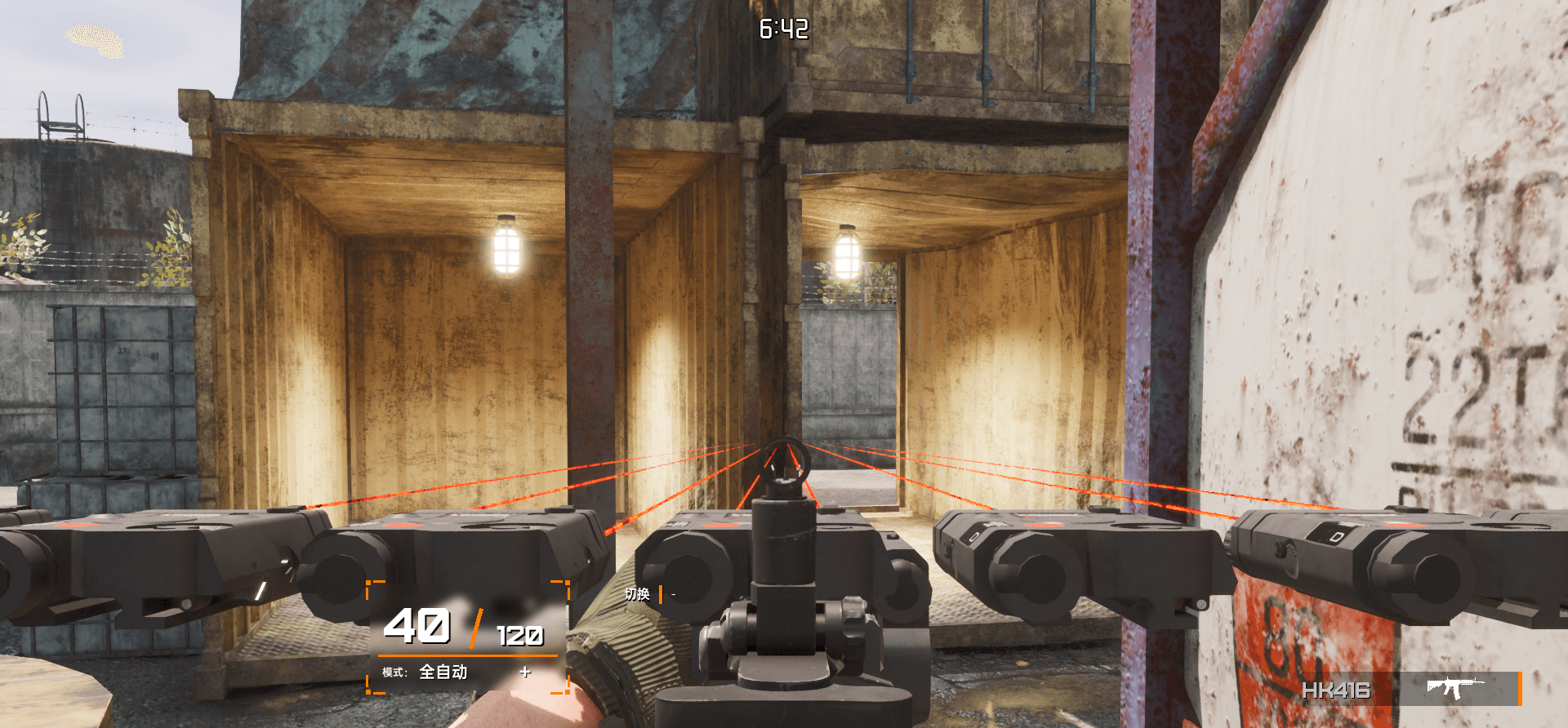
【测试版本】武器装备完毕,进入游戏配件出现位置错误

【测试版本】武器装备完毕,进入游戏配件出现位置错误

武器装备完毕,进入游戏配件出现位置错误时,查看这篇文含就可解决

武器装备完毕,进入游戏配件出现位置错误时,查看这篇文含就可解决

2024年8月20日 12:00

2024年8月20日 12:00

*上图为文章封面

*上图为文章封面

  1. 点击“此电脑”
  2. 进入C盘
  3. 点击“用户”
  4. 点击你的电脑的名字的文件夹
  5. 在文件浏览窗口点击上方“查看”
  6. 点击最下方“显示”
  7. 勾选“隐藏的项目”
  8. 点击“AppData”
  9. 点击“Local”
  10. 在文件浏览窗口点击右上方的“搜索”
  11. 搜索“brinkofwar”(没有空格)
  12. 进入“brinkofwar”文件夹
  13. 进入“Saved”文件夹
  14. 右键删除除了xp开头的所有文件(xp开头文件删除将会影响到你的经验)
  15. 重新开始游戏即可!


本文链接:

https://bfw.framer.ai/帮助/测试版本武器装备完毕进入游戏配件出现位置错误

© 2024 Valve Corporation. Steam and the Steam logo are trademarks and/or registered trademarks of Valve Corporation in the U.S. and/or other countries. © 2024 Epic Games, Inc. All rights reserved. Unreal, Unreal Engine and their respective logos are trademarks or registered trademarks of Epic Games, Inc. in the U.S. Patent and Trademark Office and elsewhere. All other trademarks and trade names are the property of their respective owners.

版权所有:我要自己做游戏、核蛋拌面

© 2024 Valve Corporation. Steam and the Steam logo are trademarks and/or registered trademarks of Valve Corporation in the U.S. and/or other countries. © 2024 Epic Games, Inc. All rights reserved. Unreal, Unreal Engine and their respective logos are trademarks or registered trademarks of Epic Games, Inc. in the U.S. Patent and Trademark Office and elsewhere. All other trademarks and trade names are the property of their respective owners.

版权所有:我要自己做游戏、核蛋拌面

© 2024 Valve Corporation. Steam and the Steam logo are trademarks and/or registered trademarks of Valve Corporation in the U.S. and/or other countries. © 2024 Epic Games, Inc. All rights reserved. Unreal, Unreal Engine and their respective logos are trademarks or registered trademarks of Epic Games, Inc. in the U.S. Patent and Trademark Office and elsewhere. All other trademarks and trade names are the property of their respective owners.

版权所有:我要自己做游戏、核蛋拌面

Create a free website with Framer, the website builder loved by startups, designers and agencies.